
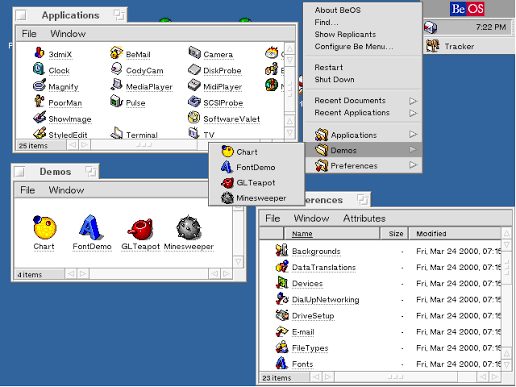
One of the parts that makes BeOS what it is, the iconic deskbar. For people who do not know, the deskbar is a small rectangular tray located in the top-right of the screen. If you click on the deskbar, you get a couple of folders, which you can then click through again to see all of your installed applications and launch them if you want to. If you are new to the operating system, it will feel painful, but you will slowly adapt and even feel comfortable with it.
If you keep forcing yourself to use the Deskbar, eventually, your brain and muscles will memorize where your applications are, which means that launching them will become a built in shortcut in your brain. This makes it significantly easier than browsing through the applications folder or opening up a start menu that gives you search results instead of your applications. There are also various other factors as to why people find the Deskbar easy to use.
One of the significant things about the Deskbar is that it is really easy to access, and you simply cannot go wrong with accessing it. It is on the top right corner of your screen which means even if you overshoot your mouse, it'll still end up on the Deskbar applications menu. This is one of the signature features of BeOS or any other Derived/Forked OS. The Deskbar also provides a way of accessing your settings through small widgets, which makes it the ultimate system control hub that's always on your screen
While some people might not find the Deskbar intuitive, it does really depend on personal preference and what they are used to, as the Deskbar is not a indexed searcher, but rather a application picker that expects to know where your applications are.